Adding the Meeting Phone Number to Remote Meeting Details (Teams Integration)

When using the Teams Integration, the Meeting Phone Number will not automatically populate in the Remote Meeting Details section.
However, Admins can manually add the Meeting Phone Number and Conference ID by following these steps:
-
Launch the Teams Meeting
-
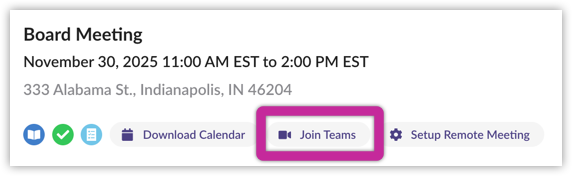
Select Join Teams to open the meeting.
-
-
Access Meeting Information
-
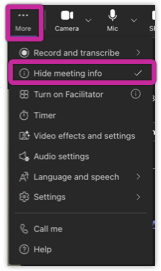
In the Teams Meeting window, select More → Meeting Info.
-
-
Copy the Dial-In Details
-
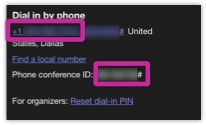
Copy the Dial in by phone number and Conference ID.
-
-
Update OnBoard Remote Meeting Details
-
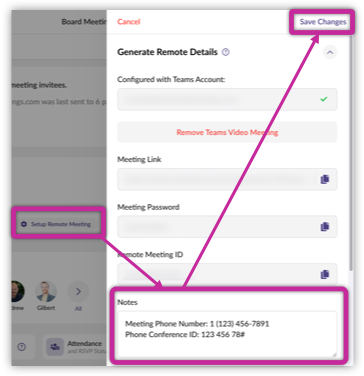
In OnBoard, select Setup Remote Meeting.
-
Paste or type the Meeting Phone Number and Conference ID into the Notes section.
-
Click Save Changes.
-
Once saved, meeting invitees can view the Meeting Phone Number and Conference ID in the Notes section by selecting More Details.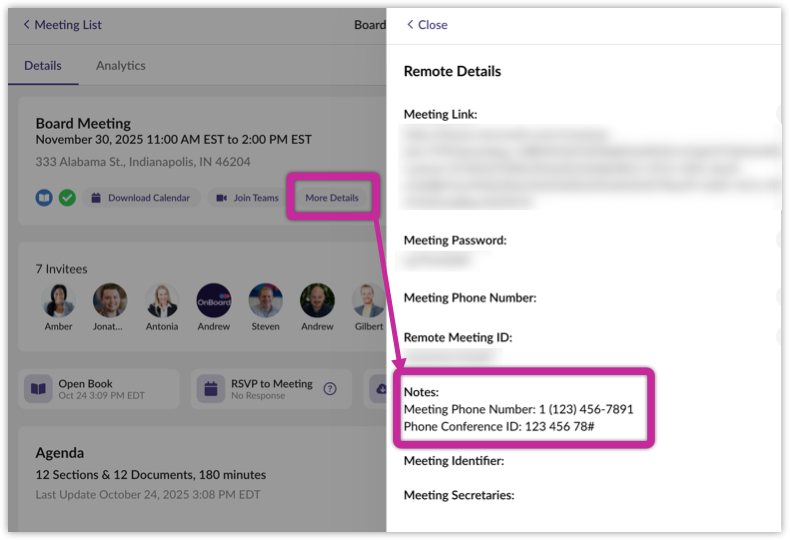
Comments
0 comments
Please sign in to leave a comment.